

Monday Geek Out: Verizon Wireless Droid
For the past week (or two), I've had the pleasure of being able to test out the latest "hot phone" to hit the market, the Droid from Verizon Wireless. When I first got it, I instantly became a celebrity to my fellow tech heads. I brought it to a few networking events, and gathered a few crowds for my phone, not my business card. Your phone as a networking tool? This phone was really fulfilling it's promises.
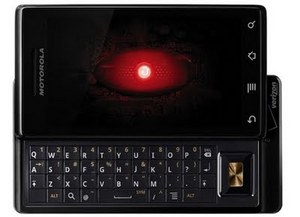
The Droid can see you...
Right out of the box, you can tell that the Droid takes it branding as a futuristic robot seriously. The glowing red eye, the boxy design, and the low, robotic voice announcing "Droiiiiddd" when you first turn it on are designed to make you feel as if you are touching a piece of technology from the future. With the souped up version 2.0 of Google’s Android OS, and a handset full of offerings at your fingertips, you would think that there should be little left to yearn for, and for the most part you'd be correct.
Things that I like:
- The Slide Out Keyboard: I know that many people who have had problems with this phone have used this as their stone to cast, but I really came to love it. The thing that I get annoyed with on touch screens is that actual typing of words. I always hit an incorrect key at an inopportune moment, or end up on a website by accident, but this problem was really helped with the addition of a slide out keyboard. If you are one who doesn't like a slide out keyboard, the on screen keyboard mimics the iPhone with it's click feel and bubbled letter that appears above your choice.
- The Google Integration: As someone who works "in the cloud," the Google integration was easy and extremely useful. I had the ability to sync with my Gmail, my Calendar and my documents without a second thought. Most of it was done for me. Also, the addition of Google Map images to the GPS feature was great (and really cool looking). I got lost on the way to meet with a client in Jackson, and was able to find my way there with very little effort. It worked exactly how it was supposed to, and with technology, that is usually the hardest step. It needs to be recognized that as impressive as the GPS is, it is only as impressive as the 3G service provides. If you need to recalculate and are in an area with no 3G service, you are out of luck. There is still room in the world for your Garmin (you didn't waste your money).
- The 5MP Camera: I really liked having a camera this sharp on a phone. I am one who uses their camera phone constantly, so being able to have an impressive camera with video capability was a plus for me. The other cool aspect is that the camera was integrated into a lot of the available apps. For instance (and I know that this isn't exclusive to the Droid) on the Facebook app, you can take a picture within the app and have it uploaded to your profile immediately.
Things that I didn't care for:
- The App Store: I know that the phone is new, and people haven't been able to design for it as long, but the store is really lacking. Not only in terms of the actual apps being provided, the store also lacks a program for the desktop for added stability. When things are stopped mid-download or didn't quite work with the rest of your phone, I felt a little weird not having a quick fix on my desktop to work through things. It may have been just a mental thing, but I missed having that security.
- The Music Store This is when you know that I've been spoiled by iTunes. Powered by the Amazon Music Store, I missed having the iTunes exclusive content, their extensive library and the interface that I use for every other piece of technology that I play music on. There is still something to be said for all of your devices speaking the same language without having to force it. It wasn't as clean, and it got more annoying as I used it. (On the flip side, I loved the Pandora app, and ended up using that feature on more than one occasion while I took my dog for a walk. It worked seamlessly with my online Pandora account, and stayed true to the format.)
The Verdict: Overall, I really enjoyed my time with the Droid from Verizon Wireless. It worked (for the most part) in the ways that I wanted it to, and did more than I was expecting it to. Other than a few annoyances with integrating it to a few things (ie: my work email) I would have no problem with recommending it to a friend. When my biggest annoyance is that stupid robot voice announcing, "Droid" at every turn when I first got it (and shut it off as much as I could), you have to expect that I was pretty happy with it.
Kyle Stuef is a marketing consultant who blogs on Internet/technology trends, and being a young professional in Ypsilanti and Ann Arbor for The Deuce and AnnArbor.com
He can be reached at:
kstuef@gmail.com
@KyleStuef
www.linkedin.com/in/kylestuef
www.facebook.com/kylestuef